The oven takes a long time to activate from standby and shows three dots on the display
Issue
When pressing the ON button of the oven on standby, it takes some seconds until the oven is ready to be used.
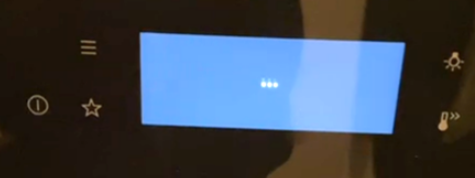
There are three dots shown in the oven display (as shown below).
The oven takes longer than expected to turn on
Resolution
The issue can be resolved by connecting the appliance to the WiFi network.
You can find information on how to connect your appliance to your WIFI in the user manual chapter “Wireless connection”.
After connecting the appliance to your WiFi, the issue should be resolved.
Was this article helpful?
Related Articles
- Symbols and functions on your Electrolux oven
- Appliance Reset - How to reset the appliance?
- How to set a cooker timer (duration) / minute minder
- How to clean the Electrolux oven with pyrolytic function? (video)
- How to Set the Oven Clock
- Oven displays SAFE or padlock symbol
- Oven light does not work
- How To Remove Oven Shelf Supports For Cleaning
- How to use Catalytic Cleaning on your Electrolux oven
- Oven clock flashes or time displaying 00:00 / 12:00 - Electrolux
Related Articles
- Symbols and functions on your Electrolux oven
- Appliance Reset - How to reset the appliance?
- How to set a cooker timer (duration) / minute minder
- How to clean the Electrolux oven with pyrolytic function? (video)
- How to Set the Oven Clock
- Oven displays SAFE or padlock symbol
- Oven light does not work
- How To Remove Oven Shelf Supports For Cleaning
- How to use Catalytic Cleaning on your Electrolux oven
- Oven clock flashes or time displaying 00:00 / 12:00 - Electrolux