Oven light does not work
Issue
- The oven light does not work
- The bulb in the oven does not turn on
- How to replace the light bulb in my oven?
Applies to:
- Ovens
Resolution
Sometimes the light/lamp inside the oven may not come on. Before we look at replacing the bulb, here are a few points worth noting:
1. Your oven is technically correct and there is no fault with your oven. Some heating modes will not automatically turn on the light:
- For example during the "Humid Hot Air" heating mode, the oven light remains off.
- For example during the "Moist Fan Baking" heating mode, the oven light turns off after 30 seconds.
Check if the light works by turning on the 'Light' or 'Conventional Cooking' function.
Both these modes will automatically turn the light/lamp on. If it doesn't come on, this will indicate a problem with the lamp itself (*or potentially something else).
In some models, the lamp may automatically deactivate at a temperature below 60 °C during some oven functions.
If the lamp fails to operate it may be defective and need replacing (see steps on how to remove/refit below).
If the oven is new and within the manufacturer's warranty and the lamp has suddenly stopped working please contact the retail outlet you purchased the oven as the lamp should not be defective straight out of the box.
*If you have replaced the defective lamp and it still doesn't work, there may be another issue that will require an engineer visit.
Replace the light bulb
If the light does not work in any heating mode, and the bulb’s glass is dark/black, it is likely to be blown and thus needs to be replaced.
- Refer to the instructions in the user manual on how to replace the light bulb.
- Before you purchase a new light bulb, make sure you know the exact type of socket used (e.g. E14, G4, G9).
- You can buy a new bulb from our Webshop
Note: To replace faulty LED light sources which are normally built into the product, we recommend contacting an Authorized Service Center.
Top Lamp
1. Turn off the oven. Wait until the oven is cold
2. Disconnect the oven from the mains
3. Put a cloth on the bottom of the cavity
4. Twist (usually to the left) the glass cover that protects the bulb to remove it. Sometimes this can be very stiff, try using a tea towel to increase purchase.
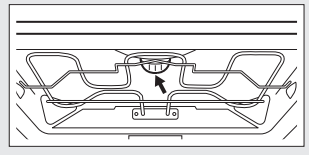
5. Clean the glass cover
6. Gently remove the bulb from its housing. If it is a small capsule bulb you will need to pull forward. If it is a standard bulb you will need to turn it anti-clockwise. Sometimes this can be stiff so we would recommend using a tea towel to increase the purchase of the bulb.
7. Replace the bulb with your new 300-degree heat-resistant lamp.
8. Put the glass cover back and twist it in place to secure it.
9. Turn the mains back on and select the light function or a particular heat function (as mentioned above) to test if the light is now working.
Side Lamp
1. Some of our appliances have a lamp on the side of the oven cavity as well.
2. Remove the left shelf support to get access to the lamp. These usually come off just by pulling. Some need a screw to be removed.
3. Use a Torx 20 screwdriver (or a teaspoon) to remove the cover.
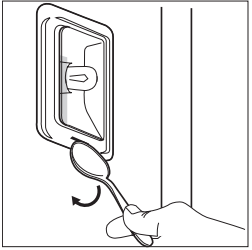
4. Remove and clean the metal frame and the seal.
5. Replace the lamp with a suitable 300-degree heat-resistant lamp.
5. Install the metal frame and the seal. Tighten the screws.
6. Install the left shelf support.
If you have replaced the bulb in the appliance with a correct replacement and the issue is still occurring we would recommend a visit from an authorised technician. - Please select 'Book a Repair' and either book online or contact our team.
Some appliances with LED lamps installed will need a technician to replace them. This will also be detailed in your user manual if this applies to your appliance.
Contact an Authorized Service Center.
If the above advice does not resolve the problem, we recommend requesting a visit by a service engineer.
Was this article helpful?
Related Articles
- Oven displays error message F11 / F111
- How to clean and care for your Electrolux oven
- Oven blows / Trips fuses
- Oven Glass Shattered
- How to use Catalytic Cleaning on your Electrolux oven
- Oven displays SAFE or padlock symbol
- How to set a cooker timer (duration) / minute minder
- Oven displays error message E0020
- Electric grill - open door grilling
- Grill pan handle requests
Spare parts & Accessories
Find original spare parts for your appliance in our webshop and have them delivered directly to your door.
Related Articles
- Oven displays error message F11 / F111
- How to clean and care for your Electrolux oven
- Oven blows / Trips fuses
- Oven Glass Shattered
- How to use Catalytic Cleaning on your Electrolux oven
- Oven displays SAFE or padlock symbol
- How to set a cooker timer (duration) / minute minder
- Oven displays error message E0020
- Electric grill - open door grilling
- Grill pan handle requests