How to use the ovens' camera?
Resolution
Question:
- How to use the CookView® Camera?
Applies to:
- CombiSteam Pro Smart connected oven
Answer:

Info:
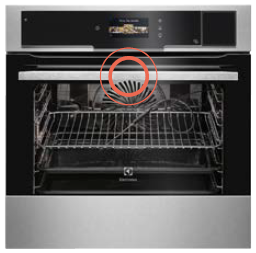
- The camera is integrated in your ovens door handle.
Was this article helpful?
Related Articles
- How to clean the Electrolux oven with pyrolytic function? (video)
- How to Set the Oven Clock
- Oven displays SAFE or padlock symbol
- Oven light does not work
- Symbols and functions on your Electrolux oven
- How To Remove Oven Shelf Supports For Cleaning
- Appliance Reset - How to reset the appliance?
- How to use Catalytic Cleaning on your Electrolux oven
- Oven clock flashes or time displaying 00:00 / 12:00 - Electrolux
- Oven displays error code (F and number)
Related Articles
- How to clean the Electrolux oven with pyrolytic function? (video)
- How to Set the Oven Clock
- Oven displays SAFE or padlock symbol
- Oven light does not work
- Symbols and functions on your Electrolux oven
- How To Remove Oven Shelf Supports For Cleaning
- Appliance Reset - How to reset the appliance?
- How to use Catalytic Cleaning on your Electrolux oven
- Oven clock flashes or time displaying 00:00 / 12:00 - Electrolux
- Oven displays error code (F and number)