How to use oven camera shield?
Resolution
Question:
- How to use oven camera shield?
- When should I use oven camera shield?
Applies to:
- Oven with built-in camera
Answer:
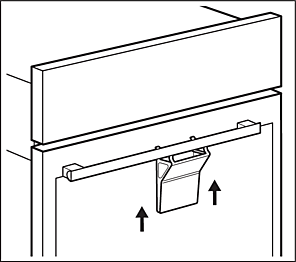
1. Use the camera shield for the best quality of the picture if your room lighting favours reflections.
- Press the camera shield between the door glass and the handle, in the central position.
- Lean the longer hooks on the glass and the shorter ones on the back of the handle.
Was this article helpful?
Related Articles
- How to set a cooker timer (duration) / minute minder
- Oven displays SAFE or padlock symbol
- Electric grill - open door grilling
- Grill pan handle requests
- Symbols and functions on your Electrolux oven
- Appliance Reset - How to reset the appliance?
- How to clean the Electrolux oven with pyrolytic function? (video)
- How to Set the Oven Clock
- Oven light does not work
- How To Remove Oven Shelf Supports For Cleaning
Related Articles
- How to set a cooker timer (duration) / minute minder
- Oven displays SAFE or padlock symbol
- Electric grill - open door grilling
- Grill pan handle requests
- Symbols and functions on your Electrolux oven
- Appliance Reset - How to reset the appliance?
- How to clean the Electrolux oven with pyrolytic function? (video)
- How to Set the Oven Clock
- Oven light does not work
- How To Remove Oven Shelf Supports For Cleaning