Dishwasher does not beep at the end of the cycle
Resolution
If the dishwasher does not emit an acoustic signal at the end of the cycle, it means that the sound notification function is probably switched off.
This function is set of OFF by default (model depending).
1. The basic dishwasher settings can be changed in the settings mode.
2. To enter the settings mode, press and hold the appropriate key combination at the same time (this depends on the dishwasher model).
Detailed information on disabling or enabling this function and navigating the settings is provided in the user manual in the chapter "Basic Settings" / “Settings”.
Example control panel and how to enter the settings mode*
*Note: The images shown below are for reference only and may represent a different or earlier user‑interface version. Button layout, programme names, symbols, or indicators may vary depending on the appliance model. Always refer to your user manual for information specific to your appliance.

You can enter setting mode before starting a programme.
You cannot enter setting mode while the programme is running.
To enter setting mode, press and hold simultaneously QUICK and ECO for about 3 seconds. The lights related to the Previous, OK and Next are on.
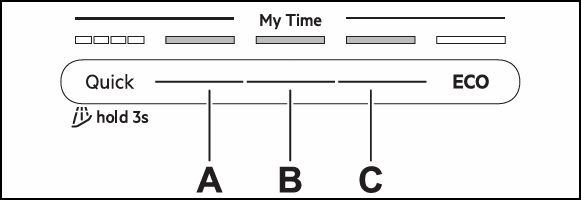
A. Previous button
B. OK button
C. Next button
Use Previous and Next to switch between the settings and to change their value.
Use OK to enter the setting and to confirm changing its value.
How to change an End Sound (ES) setting
Make sure the appliance is in setting mode.
1. Press Previous or Next to select a setting. The display shows the setting name. Go to “ES” setting.
2. Press OK to enter the setting. The current setting value flashes.
3. Press Previous or Next to change the value.
4. Press OK to confirm the setting. The setting is saved. The appliance returns to the settings list.
5. To exit setting mode, press and hold simultaneously ECO and AUTO for about 3 seconds. The appliance returns to the programme selection.
Was this article helpful?
Related Articles
- Dishwasher displays error message iF0, iFo or iF1
- How to set the programme with QuickSelect on your Electrolux dishwasher
- Dishwasher is making unusual noises
- Dishwasher displays error message C2, F2, i20, AL6, beeps 2 times or LED flashes 2 times
- Rust spots on cutlery after washing in the dishwasher
- Dishwasher does not / will not start but the power is on
- Water is being filled into the dishwasher even when it is turned off
- Dishwasher displays error code iC0 - Causes and Fixes
- Dishwasher does not switch on, no light on the panel
- The auto-cleaning indicator ("Machine Care") lights up on the dishwasher
Spare parts & Accessories
Find original spare parts for your appliance in our webshop and have them delivered directly to your door.
Related Articles
- Dishwasher displays error message iF0, iFo or iF1
- How to set the programme with QuickSelect on your Electrolux dishwasher
- Dishwasher is making unusual noises
- Dishwasher displays error message C2, F2, i20, AL6, beeps 2 times or LED flashes 2 times
- Rust spots on cutlery after washing in the dishwasher
- Dishwasher does not / will not start but the power is on
- Water is being filled into the dishwasher even when it is turned off
- Dishwasher displays error code iC0 - Causes and Fixes
- Dishwasher does not switch on, no light on the panel
- The auto-cleaning indicator ("Machine Care") lights up on the dishwasher