Dishwasher displays error code i20 beeps 2 times or LED flashes 2 times
Issue
- Dishwasher displays error message C2, F2, i20 or AL6
- Dishwasher beeps 2 times, LED flashes 2 times
- Dishwasher does not drain the water
- Dishwasher not draining, an error code is displayed
Applies to:
- Integrated dishwasher
- Freestanding dishwasher
Resolution
Error code i20 or similar indicates a problem with the water drainage from the dishwasher.
1. Make sure that the sink spigot is not clogged.
2. Make sure that the filter in the outlet hose is not clogged.
3. Make sure that the interior filter system is not clogged.
Clean the filters and sump area.
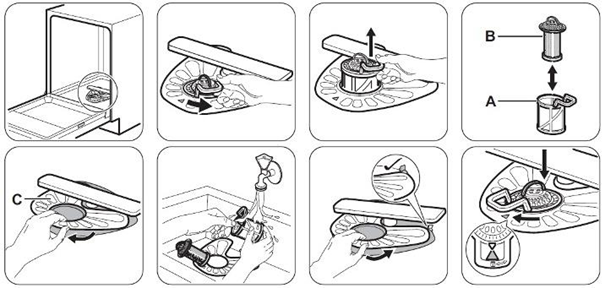
Instructional video
New Installation
4. Ensure that the drain hose has been installed correctly (see image below):
- The length of the drain hose does not exceed 400 cm.
- The drain inlet point must be between 40 and 85 cm.
- The drain hose is not damaged, kinked, or twisted
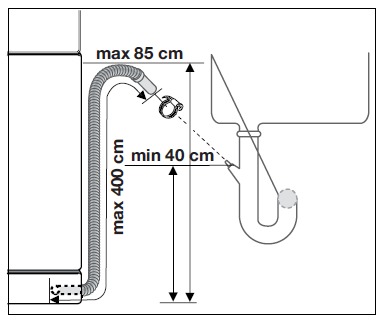
5. Check whether the blanking plug has been removed from the sink drain. (If your dishwasher has been recently installed or moved)
The blanking plug must be removed from the siphon trap. Open the inlet where the drain hose is connected to the siphon trap, remove the blanking plug, and reconnect the siphon trap inlet (see image below)
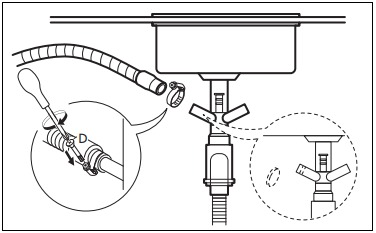
6. Check whether a reverse osmosis water filter has been installed correctly (if applicable)
If your dishwasher is connected to a sink that also uses a reverse osmosis water filtration system, check how the drain hoses are installed.
An incorrectly installed reverse osmosis drain hose can discharge residue or filtration by-products into the same drain connection used by the dishwasher. Over time, this material may accumulate in the dishwasher drain system, filters, drain hose, or sump area and restrict water drainage.
- Inspect the drain connection under the sink.
- Check whether the reverse osmosis drain hose shares the same connection as the dishwasher drain hose.
- Ensure the reverse osmosis drain hose is installed according to the filter manufacturer's instructions.
- Clean the dishwasher filters and remove any deposits or debris that may have entered the drain system.
- Run a programme and check whether the i20 error has cleared.
If the above advice does not resolve the problem, we recommend requesting a visit by a service engineer.
Cause:
FAQ – Dishwasher i20 Error Code
What does the i20 error code mean on a dishwasher?
The i20 error code indicates that the dishwasher is not draining water correctly or is detecting a drainage problem.
Why is my dishwasher showing the i20 error?
Common causes include blocked filters, a kinked or obstructed drain hose, a blocked sink drain, or restricted water flow in the drainage system.
Can dirty filters cause an i20 error?
Yes. Food residues, grease, and debris can block the dishwasher filters and reduce drainage performance, triggering the i20 error.
Can a blocked sink drain cause an i20 error?
Yes. If the sink waste pipe or trap is blocked, wastewater from the dishwasher may not drain properly and the i20 error can appear.
Can a reverse osmosis filter cause an i20 error?
Yes. If a reverse osmosis water filtration system is installed incorrectly, filtration waste or deposits may enter the dishwasher drain connection and contribute to blockages, resulting in an i20 error.
Is the i20 error always a fault with the dishwasher?
No. In many cases, the error is caused by an installation issue or a blockage in the filters, drain hose, or household plumbing rather than a fault with the dishwasher itself.
Do I need service if the i20 error remains after cleaning the filters and checking the drain system?
If the error continues after completing all recommended checks, there may be a fault with the drain pump, pressure system, wiring, or electronic control system. In this situation, service may be required.
Was this article helpful?
Related Articles
- Dishwasher displays error message i30, drains constantly
- Dishwasher comfort lift basket stuck in the upper position
- Dishwasher displays error message i40, i43 or i44
- How to deactivate AirDry on my dishwasher
- Dishwasher is stuck mid-cycle and won't allow me to select a different programme
- Dishwasher short-circuits, burns out fuses or trips RCD circuit breakers
- The dishwasher displays error code i60 or i69
- How does the AirDry function in Electrolux dishwashers work?
- Dishwasher displays error message iF0, iFo or iF1
- How to set the programme with QuickSelect on your Electrolux dishwasher
Spare parts & Accessories
Find original spare parts for your appliance in our webshop and have them delivered directly to your door.
Related Articles
- Dishwasher displays error message i30, drains constantly
- Dishwasher comfort lift basket stuck in the upper position
- Dishwasher displays error message i40, i43 or i44
- How to deactivate AirDry on my dishwasher
- Dishwasher is stuck mid-cycle and won't allow me to select a different programme
- Dishwasher short-circuits, burns out fuses or trips RCD circuit breakers
- The dishwasher displays error code i60 or i69
- How does the AirDry function in Electrolux dishwashers work?
- Dishwasher displays error message iF0, iFo or iF1
- How to set the programme with QuickSelect on your Electrolux dishwasher