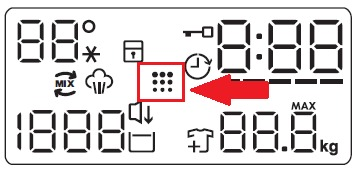
The "drum cleaning" icon shows on the washing machine display
Issue
- The "drum cleaning" icon shows on the washing machine display
- How to clean the washing machine drum?
Applies to:
- washing machine
Resolution
1. Remove all laundry from the drum
2. Add a small quantity of powder detergent into the empty drum, in order to rinse out any left residues.
3. Run a Cotton programme with the highest temperature.
Occasionally, at the end of a cycle, the display may show the icon: this is a recommendation to perform the “drum cleaning”.

Once the drum cleaning cycle (Cotton 90°C) has been performed, the icon disappears
Cause:
- The repeated and prolonged use of low-temperature programmes can cause detergent deposits, fluff residues, bacterial growth inside the drum and the tub.
- This could generate bad odours and mildew. To eliminate these deposits and clean the inner part of the appliance, run a maintenance wash regularly (at least once a month).
- We recommend specialized care & maintenance products available from our Webshop
Was this article helpful?
Related Articles
- The door of the washing machine cannot be opened
- Washing machine displays an error code, how to fix it?
- Washing machine displays error message E10, E11, C1 or emits 1 beep / 1 flash
- Washing machine displays a padlock symbol - Electrolux
- Connected appliances - problems with onboarding
- How to drain a washing machine/washer dryer
- Connected appliances - The application cannot connect to the appliance
- Washing Machine Inlet Hose Leaking: Causes and Step-by-Step Fix
- Washing machine stops in the middle of a cycle
- The washing cycle is shorter / longer than indicated on the display
Spare parts & Accessories
Find original spare parts for your appliance in our webshop and have them delivered directly to your door.
Related Articles
- The door of the washing machine cannot be opened
- Washing machine displays an error code, how to fix it?
- Washing machine displays error message E10, E11, C1 or emits 1 beep / 1 flash
- Washing machine displays a padlock symbol - Electrolux
- Connected appliances - problems with onboarding
- How to drain a washing machine/washer dryer
- Connected appliances - The application cannot connect to the appliance
- Washing Machine Inlet Hose Leaking: Causes and Step-by-Step Fix
- Washing machine stops in the middle of a cycle
- The washing cycle is shorter / longer than indicated on the display