Washing machine and tumble dryer WiFi help
Resolution
Question:
- How to turn on the WiFi connection?
- How to check the WiFi signal strength?
- How to turn on the Remote Start mode?
Applies to:
- connected washing machine
- connected tumble dryer
Resolution:
First time connection
Check whether the home router is working correctly by:
1. Check WiFi connection to your smartphone – must be ON.
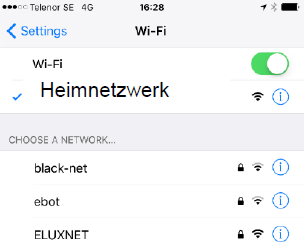
2. If there are other devices connected to home router, do the other devices work?
- If other devices does not work, restart the home router
- If other devices work, restart your washing machine or tumble dryer.
Appliance already connected
1. Check the following:
- Is the WiFi signal indicator visible in the upper left corner of the appliance's display?
- How strong the signal is (3/5, 4/5, 5/5)?
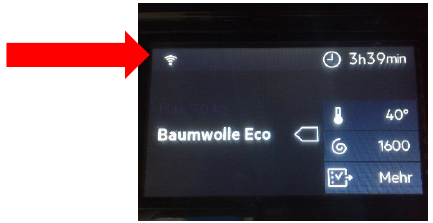
2. Turning on the WiFi connection.

3. Checking the WiFi signal strength (optimal signal strength from 3/5).

4. Turning on the Remote Start mode.
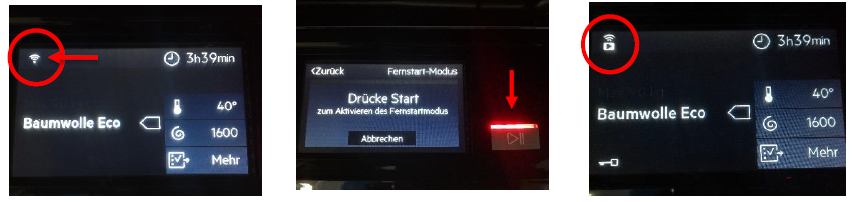
Tips:
- Always update the app to the latest version for best performance
Was this article helpful?
Related Articles
- Fabric conditioner runs directly down into the washing machine's drum
- The door of the washing machine cannot be opened
- Washing machine displays error message E10, E11, C1 or emits 1 beep / 1 flash
- Connected appliances - The application cannot connect to the appliance
- Washing machine emits humming / pumping noise
- Washing machine displays a padlock symbol - Electrolux
- Washing machine does not work / does not react
- Washing machine displays error message C9 or F9
- Washing machine displays error message EF0, EFo, EF3 or emits 15 beeps / 15 flashes
- Washing machine does not heat water, and does not display an error message
Related Articles
- Fabric conditioner runs directly down into the washing machine's drum
- The door of the washing machine cannot be opened
- Washing machine displays error message E10, E11, C1 or emits 1 beep / 1 flash
- Connected appliances - The application cannot connect to the appliance
- Washing machine emits humming / pumping noise
- Washing machine displays a padlock symbol - Electrolux
- Washing machine does not work / does not react
- Washing machine displays error message C9 or F9
- Washing machine displays error message EF0, EFo, EF3 or emits 15 beeps / 15 flashes
- Washing machine does not heat water, and does not display an error message