Electrolux AutoDose setup and advanced settings in the app (video)
Issue
- Which AutoDose advanced settings can be activated in the app?
- Is there any setup wizard available in the app for AutoDose function?
Applies to:
- washing machines with AutoDose feature
Resolution
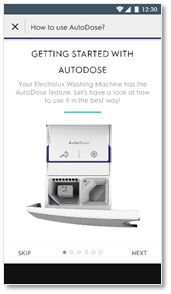
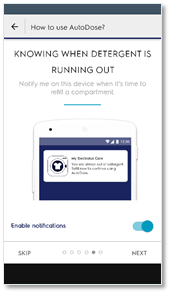
1. To help with setup of AutoDose, an additional guide is available in the App. Right after the user completes the Wi-Fi onboarding and registration, this guide will show.
- Information about how AutoDose works
- How to use the different compartments (auto vs manual)
- Configure the mode of the drawers (normal setup with softener, or link mode)
- Enable Push Notifications to get message when tank level is low
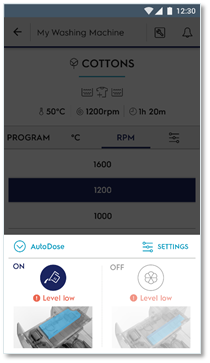
2. AutoDose can be controlled from the app, compartment On/Off. There are also additional functions only available from the app:
- Advanced Settings with compartment layout can be configured (how to use Softener tank)
- Set detergent concentration and save as favorite
- Give a name to what is in the compartment.
- Enable Fine tuning
See featured video
Was this article helpful?
Related Articles
- Grey marks on laundry after washing in washing machine
- Laundry “lifehacks” for cleaning clothes during a pandemic
- Fabric conditioner runs directly down into the washing machine's drum
- The door of the washing machine cannot be opened
- Washing machine displays error message E10, E11, C1 or emits 1 beep / 1 flash
- Connected appliances - The application cannot connect to the appliance
- Washing machine emits humming / pumping noise
- Washing machine displays a padlock symbol - Electrolux
- Washing machine does not work / does not react
- Washing machine displays error message C9 or F9
Related Articles
- Grey marks on laundry after washing in washing machine
- Laundry “lifehacks” for cleaning clothes during a pandemic
- Fabric conditioner runs directly down into the washing machine's drum
- The door of the washing machine cannot be opened
- Washing machine displays error message E10, E11, C1 or emits 1 beep / 1 flash
- Connected appliances - The application cannot connect to the appliance
- Washing machine emits humming / pumping noise
- Washing machine displays a padlock symbol - Electrolux
- Washing machine does not work / does not react
- Washing machine displays error message C9 or F9